How Community Invitations Travel from Noticeboard to Group Chat
Community invitations travel farther when each channel gives neighbors a clear next move, from noticing a flyer to forwarding a useful message.
The most common mistake with community invitations is treating a flyer and a group-chat post as the same object. That leaves people with a notice they cannot act on, or a chat message that makes sense only to those already in the conversation. Community invitations travel when each channel gives a reader a clear next move.
Think of the invitation as a handoff, not a campaign. A passerby notices it, someone considers sharing it, and a recipient decides whether to attend or ask a question. Each handoff can lose context, so the message needs to remain recognizable and usable on its own.
What makes a community invitation easy to recognize?
Give the event a stable name and a plain-language description of what will happen. “Seed-library sorting and planting discussion” is easier to pass along than a committee’s internal project name. Keep the date, time, location, and contact route attached to that description so a copied fragment does not become a mystery.
A memorable name helps people identify the invitation when it appears again in a different place. It need not be clever. “Saturday Repair Table” can be more useful than a slogan because a neighbor can recall what the event is for.
Write details that can survive separation from their original setting. “Meet at the usual entrance” assumes shared history; “enter through the library’s side door beside the garden” gives a first-time visitor a usable cue. If a detail is uncertain, identify a contact who can clarify it rather than hiding the uncertainty in vague wording.
How can a notice invite people to pass it on?
Make the sharing action obvious and low-effort. A short line such as “Please pass this to a neighbor who might want to repair a small appliance” gives a person a reasonable audience and a reason to forward the notice. Avoid implying that recipients should distribute it everywhere; that is how a modest gathering acquires the administrative footprint of a touring production.
Use a version that is easy to copy as text. Include the event name, date and time, full location, what participants will do, and a way to ask a question. A link may lead to extra details, but the message should still explain the basic invitation if the link is ignored or lost.
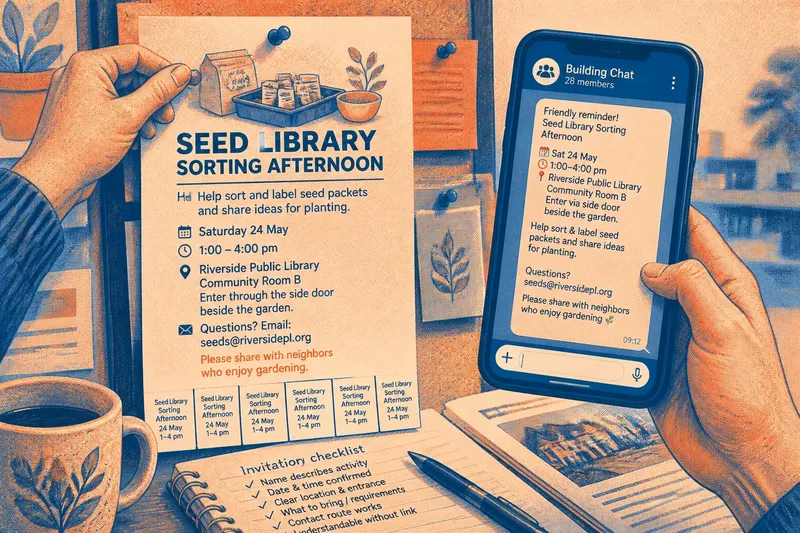
Say you are organizing a seed-library sorting afternoon at the public library. The starting information is a date, a room name, a request for volunteers to sort labeled seed packets, and an organizer’s email. You put those details into one short text, then add “Please share with neighbors who enjoy gardening” when posting to a building chat. A recipient can now identify both the task and the likely audience without asking the sender to reconstruct the plan.
What changes when the invitation moves between channels?
The essential details should stay put; the surrounding cue can change. A community-center board benefits from a visible event name and a short explanation of who is hosting it. A neighborhood newsletter can add why the project is happening. A group chat can include a personal note from the person sharing it, while keeping the invitation itself complete.
For a printed notice, use a clear title, readable text, and enough contrast for ordinary indoor lighting. Ask permission before posting. A QR code can point to fuller information, but it should not be the only way to learn the date, location, or contact method. Tear-off slips can help someone carry details away; put the event name and date on each slip so it still makes sense on its own.
For email and newsletters, put the event name and practical details near the start. A long account of the group’s history may be useful elsewhere, but it should not stand between a reader and the room number. In a chat, place essential details in the message rather than embedding them only in an image. That makes the invitation easier to search, copy, and read with assistive technology.
Which details should you check before sharing?
- Check that the event name describes the activity; if it is recognizable to a newcomer, keep it, but if it relies on group shorthand, replace it with a plain-language name.
- Check that the date and start and end times are confirmed; if they are, include them in every version, but if they are not, state when confirmation will be shared and do not circulate a guessed time.
- Check that the location includes a building and a usable entrance; if both are clear, retain them, but if “the usual room” needs explaining, add directions or a contact for clarification.
- Check whether people need to register, bring materials, or pay a fee; if any requirement applies, state it plainly, but if there is none, say that no sign-up or supplies are needed rather than leaving readers to infer it.
- Check that the contact route reaches someone who can answer questions; if it does, include it, but if it is inactive or private to the organizers, replace it with a monitored public email or other suitable route.
- Check that the invitation can be understood without its image or link; if the text carries the essential details, share it, but if it does not, add the missing information before forwarding.
How do you handle the questions people ask?
Should a flyer include a QR code?
It may provide a convenient route to extra information, but it should supplement readable text. Keep the event name, date, location, purpose, and contact method on the flyer so a reader can decide without scanning.
Is a group chat enough for a public gathering?
It can suit an event intended only for that group, but it will not reach neighbors who are outside the chat. Add a public-facing route, such as a library board or neighborhood newsletter, and make the message intelligible without chat history.
What should you do when details change?
Post a clear correction in each active channel and update the original notice where possible. Name the event and date, say exactly what changed, and make a fresh version if people have already copied the old one.
How can you tell whether sharing reached new people?
Ask attendees casually how they heard about the gathering, then note the routes they mention. The useful result is a better sense of which channel brought an unfamiliar neighbor, not a tally of every view or reaction.
When should an old invitation be retired?
Remove physical notices after the event and close or update any sign-up page that might still circulate. In digital channels, post a brief note that the gathering has passed. If the project continues, publish a new invitation with the next date rather than quietly changing an old image and hoping everyone noticed.
Keep a short record of questions that exposed a weak handoff. If several people could not tell which entrance to use, make that location cue more specific next time. This is useful maintenance; counting every reaction is not, unless someone has a clear reason to use the count.
Not worth the effort is designing a separate polished graphic for every channel. A clear text version and one relevant sharing cue are usually easier to maintain than a family of near-identical posters, each with its own opportunities to drift out of date.
Community invitations travel when the handoff is simple: a person can recognize the event, share it with someone likely to care, and leave that person with enough information to decide. Keep the name and essential details stable, and let each channel add only the context it can provide.